Technologies Used
How it started
On 13 January 2026, I started building a small project called Study Tracker.
V1 was literally HTML, CSS and JavaScript + localStorage. I made it for myself to track study hours, DSA, projects, topics and streaks. That was basically it.
The 7 Core Systems
I didn't plan for it to become this big when I started. I just kept building whatever I felt was missing. Eventually, the app evolved into 7 massive core systems:
Zoom/Expand Image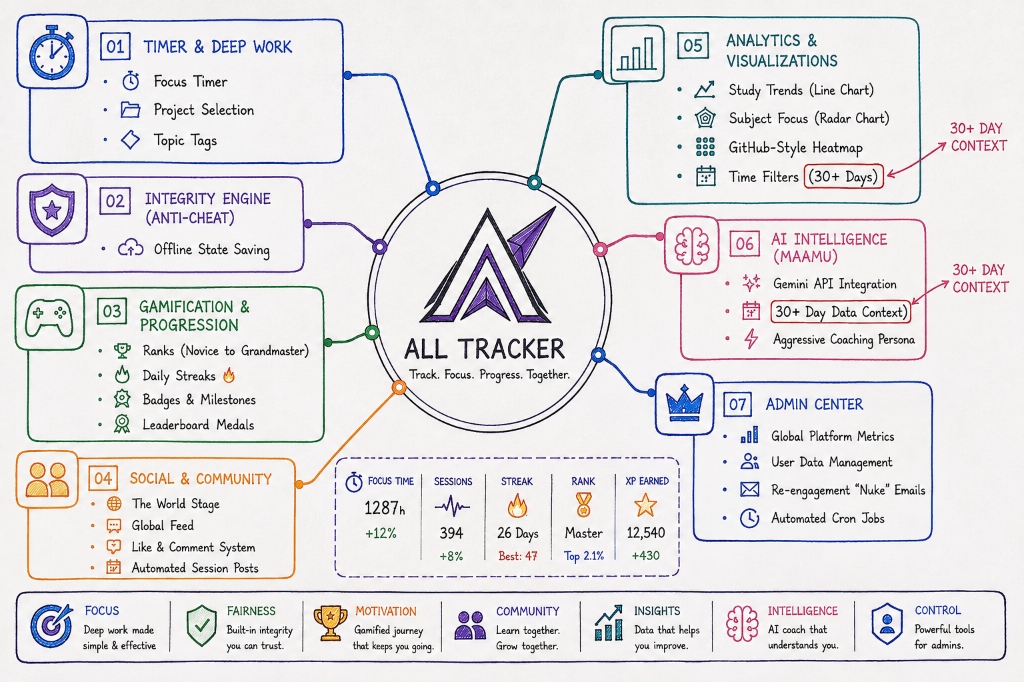
1. Timer & Deep Work
"I wanted a proper focus timer, so I built one."
It started here. A simple focus timer, project selection, and topic tags so you know exactly where your hours are going. Deep work made simple and effective.
2. Integrity Engine (Anti-Cheat)
"Built-in integrity you can trust."
Because we have leaderboards, people might try to cheat. The integrity engine and offline state saving ensure that the hours logged are legitimate.
3. Gamification & Progression
"That small dopamine hit when you see your hours go up. Kind of like… you can actually flex your hard work."
To fix my own inconsistency, I added ranks (from Novice to Grandmaster), daily streaks, badges, milestones, and leaderboard medals. It’s a gamified journey that keeps you going.
4. Social & Community
"I wanted to see what other people were doing."
I added The World Stage (global leaderboards), a live Global Feed, and a Like & Comment system. When you finish a session, it automatically posts it. We learn together and grow together.
5. Analytics & Visualizations
"Data that helps you improve."
Then came the heavy data stuff. Study Trends (Line Charts), Subject Focus (Radar Charts), GitHub-Style Heatmaps, and 30+ Day time filters.
6. AI Intelligence (Maamu)
"An AI coach that understands you."
I integrated the Gemini API to build an aggressive coaching persona. Maamu looks at your last 30+ days of data context and tells you exactly where you're slacking.
7. Admin Center
"Powerful tools for admins."
Global platform metrics, user data management, automated cron jobs, and re-engagement emails to bring people back to the grind.
Somewhere along the way, Study Tracker became AllTracker.
The Stack Evolution
| Phase | Architecture |
|---|---|
| V1 (The MVP) | HTML CSS JavaScript localStorage |
| V4 (The Scale) | TypeScript Vite Tailwind PostgreSQL Supabase Vercel Gemini Better Auth |
I honestly didn't plan for it to become this big when I started. I just kept building whatever I felt was missing.
Why I actually built it
I built this for myself… and then I stopped using it.
I made the first version of #AllTracker in one day. Used AI heavily to ship it fast. Reason was simple — I was inconsistent. I didn’t even know how much I actually studied in a day. So I built something to track it. Used it for some time… then left it. Same thing had already happened with my previous project #LakshyaPro.
At that point I realized — the problem is not the app. It’s consistency.
After a month, I came back to it with a different mindset. Not “what I want” but “why would anyone keep using this daily?” Because honestly, most productivity tools fail after 2–3 days.
So I added things which I knew people won’t ignore:
- Live competition
- Leaderboards (college-wise)
- Data insights
- That small dopamine hit when you see your hours go up. Kind of like… you can actually flex your hard work.
Now some of my friends are using it daily. Tracking, competing, trying to improve. It’s still early, but this feels different.
I’m keeping this open source. Will keep building it in public (with a lot of AI, because speed matters).
Architecture Overview
If someone asks, "Why didn't you just use React?", this is why.
AllTracker is built using a "Vanilla TypeScript" architecture. This means no heavy frameworks like React, Vue, or Angular. Instead, we use raw JavaScript (TypeScript) to directly talk to the browser (the DOM). This makes the app incredibly fast, lightweight, and gives us total control over the animations and design.
Zoom/Expand Image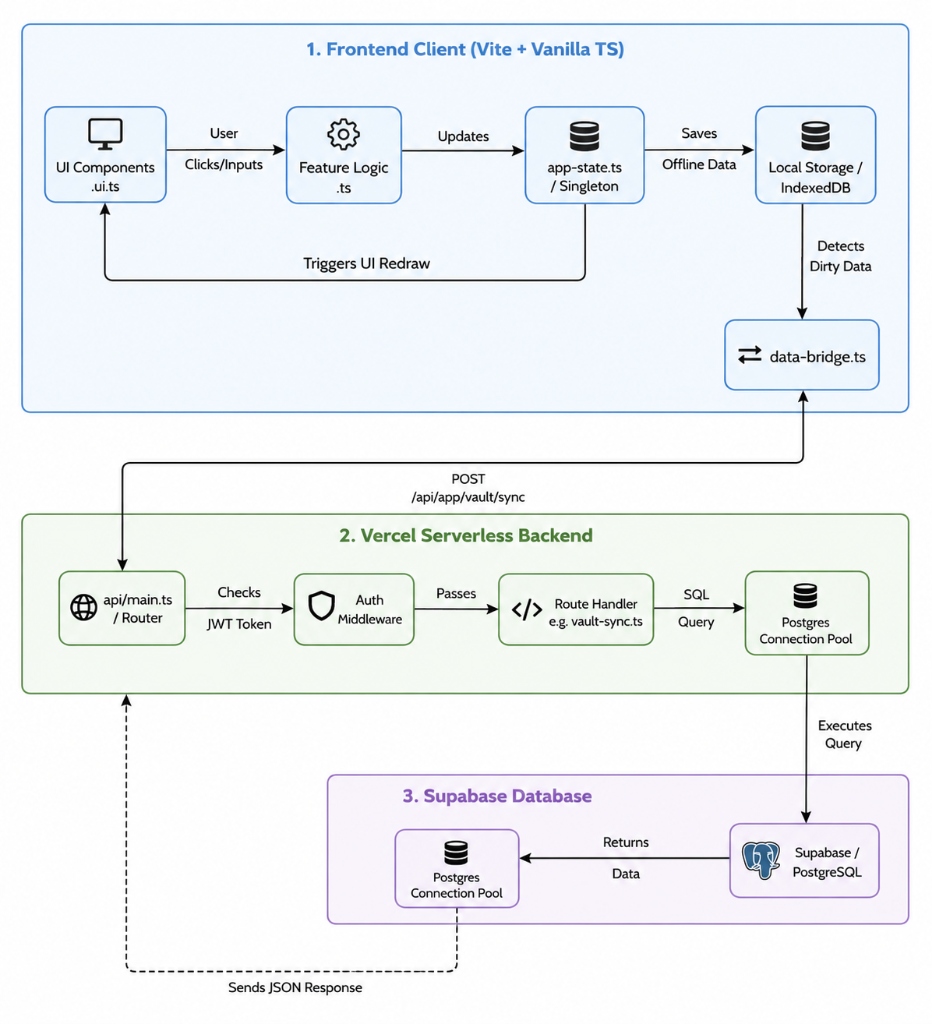
The 3 Main Layers
- Frontend: Built with HTML, CSS, and TypeScript. We use Vite to bundle it into one blazing fast package. We inject raw HTML strings via
.ui.tsfiles and bind logic manually viadocument.getElementById(). - Backend API: We use Vercel Serverless Functions. Instead of paying for a 24/7 server, Vercel spins up tiny temporary functions only when a user requests data. It scales instantly and is incredibly cheap.
- Database: We use Supabase (PostgreSQL) because we needed complex relationships (like Leaderboards sorting by total study hours). Firebase is very bad at complex sorting.
The Offline-First Sync Engine
One of the coolest parts is the data-bridge.ts system. When you study, you don't want to lose your data if your internet drops.
- Local Storage: Every time a timer ticks or a task is checked, it saves immediately to the browser's
localStorageorIndexedDB. - The Bridge: Every 5 seconds, it silently checks if there are new offline changes and pushes them to Supabase permanently.
- Conflict Resolution: If you have the app open on your phone and laptop simultaneously, it uses timestamps to figure out which device has the "latest" truth.
Technical Decisions (ADR)
- Vanilla TypeScript instead of React: The app is insanely fast and lightweight. No virtual DOM overhead means the app runs at 60 FPS even on slow devices. But developers have to manually manage DOM updates instead of relying on "useState".
- CSS Variables instead of Tailwind: We wanted to offer multiple user themes (Obsidian Glass, Tactical Navy, etc.). We wrote custom CSS relying heavily on CSS Variables (
var(--primary)). Changing a theme simply swaps the root variables for instant switching with zero JS overhead. - Switching from Groq to Gemini API: Initially, I used Groq and had users bring their own API keys (storing them locally on the frontend). But I wanted better quality answers for the "Maamu" AI coach. I switched to the Gemini API because its generous free tier let me run it natively for everyone while massively improving the intelligence of the briefings.